

OpenStack
VEXXHOST at OpenInfra Day North America 2026
VEXXHOST recaps OpenInfra Day North America 2026 in Chicago, highlighting its headline sponsorship, Mohammed Naser's talks, and the future of OpenStack operations.
Read field noteField notes / Latest
Engineering notes from operating open infrastructure: the failures, design decisions, and upstream work that make open infrastructure better.
Browse all field notesVEXXHOST recaps OpenInfra Day North America 2026 in Chicago, highlighting its headline sponsorship, Mohammed Naser's talks, and the future of OpenStack operations.
Read field note
Ceph vs SAN: Compare performance, scalability, licensing, and operational costs to choose the right enterprise storage modernization strategy.
Read field note
Cloud exit strategy checklist: Review data ownership, exit costs, vendor lock-in, and migration support before signing a cloud contract.
Read field note
Server refresh cycle for a private cloud: replace the nodes that set your density, power and support limits first, and keep older nodes on steady work.
Private cloud servers bought in one order age together, and their warranties run out together. Each expiry forces a choice between renewing support on the old server and buying its replacement, and the whole batch faces it at once.
One answer is a single server refresh cycle for everything: replace every server every five years, say. We think a private cloud should set the date per node role instead. A node's role is the job it does in the cloud, such as running the control plane, hosting VMs or storing data in Ceph. In practice:
The pull toward replacing everything early is strong in 2025. By one server vendor's 2024 estimate, 40% of enterprise servers are more than five years old. Those older units do 7% of the work and use 66% of the power. In an April 2025 paper, IDC found that 44% of organizations refresh servers every three years or less.
A private cloud on OpenStack lets you act on these figures one node at a time. This memo is for teams running a private cloud on servers they own, on premises or in colocation. By the end, you can give every node a refresh date and decide which batch goes first.
Get it wrong early and the capital goes into new servers for steady workloads that gain little from them. Get it wrong late and a failed board has no replacement part, while old nodes hold the rack power your next growth order needs.
Public data on failure by age comes from an old whole-server study and newer drive statistics. A 2010 study of over 100,000 cloud servers covered 14 months of repairs. Among servers that needed repairs, it found no trend between a server's age and how many repairs it needed.
One cloud storage operator publishes failure statistics for its fleet, which held 301,120 hard drives at the end of 2024. Its annualized failure rate for 2024 was 1.57%. The 10 TB, 12 TB and 8 TB drives had the highest rates. The 8 TB and 12 TB drives were five to eight years old. The 14 TB and 16 TB drives, aged two to four years, stayed low and stable.
Ask your hardware vendor for failure data on boards and power supplies by generation. Your best evidence of server lifespan is your own: hardware tickets and replaced parts per node, grouped by purchase batch.
Check which repair terms end with your support contract, such as onsite parts response times. Price any post-warranty support offer per node, then compare it with the cost of replacing the same node.
Ask the vendor how long it will supply parts for each generation you run. One option is to retire a few nodes of an old batch early and keep them as parts donors for the rest.
The cost of a hardware failure depends on design.
Take a cloud built so that losing one rack or zone does not take the cloud down: Ceph OSDs spread across racks and zones, and control services run highly available. There, a dead compute node means evacuating its VMs. Nova rebuilds them on another host.
Applications with healthy redundant instances on other hosts and working failover can keep serving while the affected VMs are rebuilt and started. If the failed node is a single point of failure for an application, that application is down until the dependency is recovered.
The gain from new hardware depends on how old the old hardware is. A 2020 Uptime Institute analysis of SPECpower data estimated that replacing a 2015 server in 2019 might provide only about 20% more work for the same watts. For a 2008 or 2009 server replaced in 2012, the gain could be 200% to 300%.
Deployed servers sat idle about 75% of the time on average, and idle power was rising. That left a strong energy case for replacing servers up to nine years old and a far less clear one for servers up to three.
Check each generation's end-of-support terms for firmware and BIOS updates, and set them against the OpenStack and kernel releases you plan to run over the next three years. A release you need that drops an older CPU generation moves that batch's date forward.
A fleet standardized on one configuration can be easier to run, with one firmware baseline, one CPU model for live migration and one spare parts kit, for example. Ask the vendor about batch pricing, and ask finance how the assets should be grouped for depreciation.
The hyperscalers depreciate servers over five to six years. Most of them lengthened that period between 2022 and early 2025. One shortened part of its fleet back to five years in January 2025.
Those figures are accounting estimates that spread a server's cost across its years in service. When a particular server should leave the rack depends on its support dates, its failure record and what its rack power could run instead.
A single refresh wins in two cases:
Per-core licensing can tip a larger cloud the same way. When most workloads are licensed per core, newer nodes doing the same work on fewer cores can pay for replacing every node at once.
Each role gets its own trigger:
Older compute nodes move into that last group as newer ones arrive. They retire when a part cannot be sourced or post-warranty support costs more than a replacement.
Once the replacement servers are enabled and meet the workload's scheduling requirements, the scheduler can place new VMs on them. Old compute hosts are drained one at a time:
Live migration needs compatible CPUs and a supported storage setup (shared storage, volume-backed instances or a block migration that copies local disks), and a migration can fail to complete. Nova also documents cold migration, which shuts a VM down, moves it to another host and restarts it. Check which VMs can move that way, and plan a window for them.
Atmosphere is the open source OpenStack platform we build. Its maintenance guide covers this compute drain and a separate drain for control plane nodes. To retire a Ceph storage node, follow the OSD and host removal procedure of whatever deploys and runs your Ceph cluster. Adding the new hosts and removing the old ones are separate steps; plan them with whoever runs your cloud.
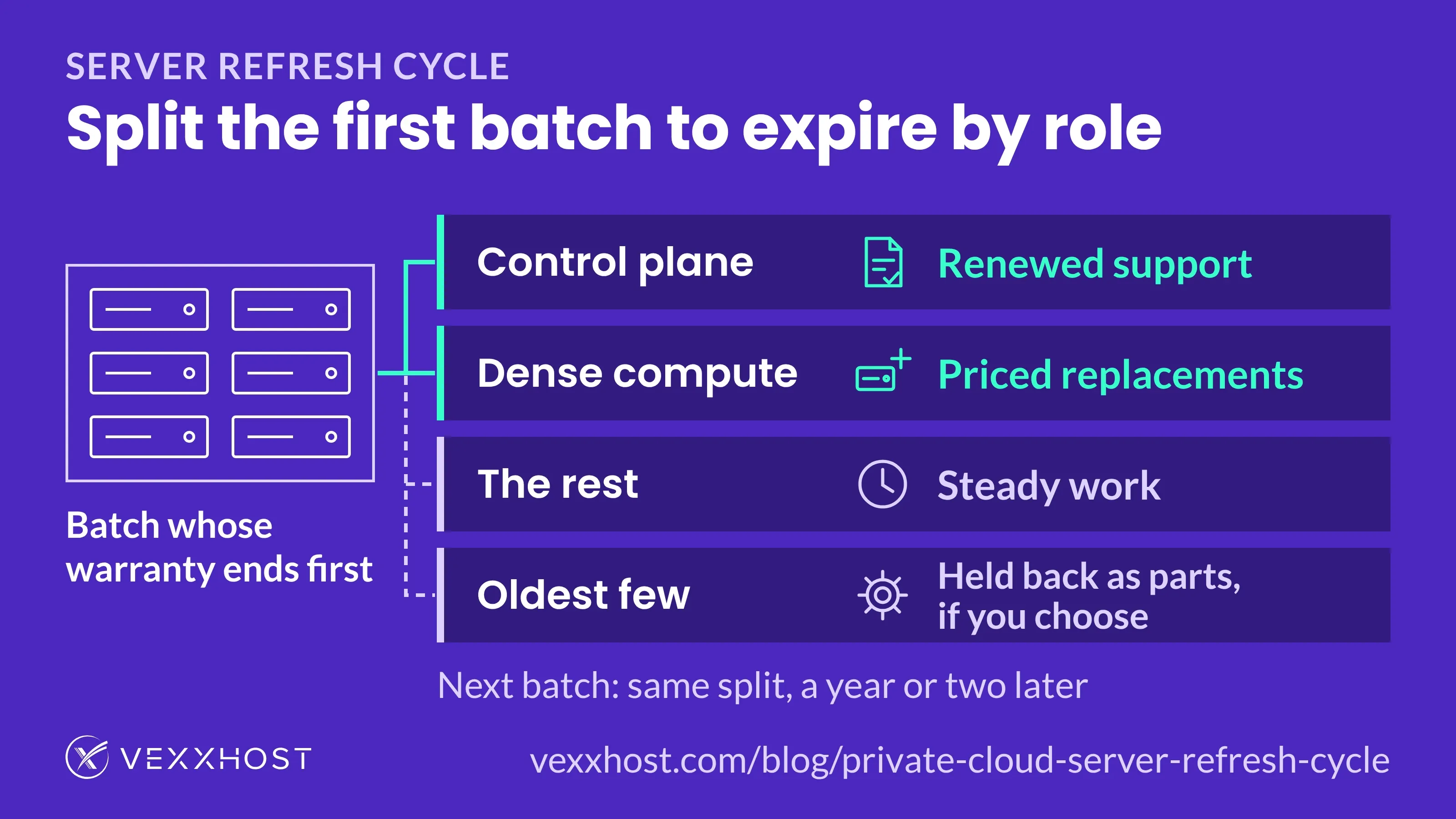
Start with the purchase batch whose warranty ends first. Split it by role while the renewal and the fleet quote are still open. Its control plane nodes get renewed support and its dense compute nodes get priced replacements. The rest move to steady work, with the oldest few held back as parts if you choose. The next batch gets the same split a year or two later, so the fleet carries two or three generations side by side.
Running that many generations at once needs draining to be everyday maintenance, and the compute drain in our published Atmosphere maintenance guide is that everyday step.
If the servers are yours, the On-Premise edition is vendor-neutral on hardware. The replacement batch can come from a different server vendor than the one being retired. It needs compatible hardware, and the CPU model check above applies to it too. Before anyone signs the support renewal for that first batch, a conversation with us can check the role split against your rack power and support dates.
Choose from Atmosphere Cloud, Hosted, or On-Premise.
Simplify your cloud operations with our intuitive dashboard.
Run it yourself, tap our expert support, or opt for full remote operations.
Leverage Terraform, Ansible or APIs directly powered by OpenStack & Kubernetes