
What Data Sovereignty Means for Kubernetes Infrastructure
Most teams think picking an EU region solves data sovereignty. It doesn't. Learn what sovereign Kubernetes actually requires — and how to get there.

Insights, updates, and stories from our team
Most teams think picking an EU region solves data sovereignty. It doesn't. Learn what sovereign Kubernetes actually requires — and how to get there.

GPUs get the headlines but storage, networking, and scheduling determine real AI performance. Learn what actually matters and how open infrastructure helps.

VEXXHOST's recap of KubeCon Europe 2026 in Amsterdam — key trends in managed Kubernetes, data sovereignty, platform engineering, AI infrastructure, and security.

Learn how to deploy hybrid clouds with OpenStack and Atmosphere for flexibility, control, and enterprise-ready scalability.
Hybrid cloud has rapidly become the de-facto cloud strategy for enterprises, blending the control of private infrastructure with the scalability of public cloud. In fact, 73% of organizations employ a hybrid cloud approach. OpenStack plays a pivotal role in these hybrid architectures by serving as a flexible on-premise foundation that integrates seamlessly with public clouds. This guide will walk you through the technical considerations of deploying a hybrid cloud with OpenStack, from planning and setup to networking, identity, and security.
Industry data shows hybrid cloud is now the primary deployment strategy for many organizations, outpacing single-cloud or purely multi-cloud approaches (39% of surveyed companies identified hybrid cloud as their primary strategy, vs. 33% multi-cloud and 27% single-cloud).
Hybrid cloud refers to using a mix of private cloud (or on-premises infrastructure) and public cloud services, with interoperability between the two. This model lets you run sensitive or steady-state workloads in your private environment while “bursting” or offloading other tasks to public cloud resources when needed. The appeal is clear: greater flexibility, cost optimization, and avoidance of vendor lock-in. OpenStack is uniquely suited to hybrid deployments for several reasons:
In summary, OpenStack offers the control and security of private infrastructure while still enabling the agility of public cloud, making it a strong foundation for hybrid cloud deployments. Below, we delve into the key steps and technical considerations for deploying your hybrid cloud using OpenStack.
Building a hybrid cloud with OpenStack involves bridging two worlds – your OpenStack-powered private cloud and one or more public cloud environments. The following steps outline how to design and implement this, with best practices at each stage:
Any successful deployment starts with planning. Assess your workloads, compliance requirements, and performance needs to decide what runs where. This approach lets you optimize costs by running predictable workloads on private infrastructure and leveraging public cloud for surges. Identify data that must remain on-premises for regulatory reasons (and plan to keep it in OpenStack) versus data that can reside or be backed up to the public cloud.
Also design the topology: will your OpenStack cloud act as just one region in a multi-region setup? Many organizations treat OpenStack as an on-prem region and use a public cloud as another region for disaster recovery or bursting. Document network addressing, identity management, and how applications will communicate across the environments. A clear architecture blueprint will guide the subsequent steps.
With a plan in hand, proceed to deploy the OpenStack cloud that will serve as your private side of the hybrid. You can set up OpenStack using various methods or leverage a managed OpenStack platform to speed up deployment. Atmosphere OpenStack accelerates this step handling the OpenStack installation, configuration, and day-2 operations for you.
Whether self-deployed or managed, ensure your OpenStack cluster is production-ready: configure it for high availability (controller node redundancy, database clustering, etc.), set up storage backends (e.g. Cinder volumes and Swift or Ceph for object storage), and integrate any needed enterprise systems (e.g. LDAP/AD integration for identity if needed). Verify that your OpenStack cloud is functioning (launch some test instances, allocate network resources) before proceeding.
Tip: It’s wise to deploy OpenStack with the same version and configurations that your managed service or distribution supports across environments. Upstream OpenStack is fully open-source – a benefit since Atmosphere and other providers use upstream OpenStack with no proprietary forks. This ensures compatibility and avoids any vendor-specific limitations when extending to hybrid.
A hybrid cloud depends on secure, reliable connectivity between your private OpenStack and public cloud environments.
Though networking can be one of the more complex steps, once established, your hybrid cloud functions as a unified environment. Always test connectivity (ping, curl, etc.) to confirm proper routing.
Managing hybrid environments shouldn’t force users to juggle separate credentials. Atmosphere simplifies identity and access with built-in federation, aligning with OpenStack’s Keystone but adding automation and enterprise integration.
By handling federation and policy mapping automatically, Atmosphere reduces friction—and operational burden—while boosting security and usability. With built-in SSO, IdP integration, and consistent RBAC, user onboarding and access control become smoother and more robust.
One challenge in hybrid cloud is managing two environments without doubling your effort. The solution is to use common orchestration and automation tools that can interface with both OpenStack and public cloud APIs. This ensures you deploy and configure infrastructure in a uniform way across the hybrid cloud:
In short, treat your hybrid cloud as one environment from a DevOps perspective. By deploying and managing resources with common toolsets and practices, you’ll minimize errors and ensure consistency across your OpenStack and public cloud components.
Operating a hybrid cloud introduces additional considerations around security and governance, but OpenStack provides features to address these:
Deploying a hybrid cloud with OpenStack may seem complex, but breaking it down into these steps and considerations makes it manageable. Below is a quick recap of key technical considerations and how OpenStack addresses them:
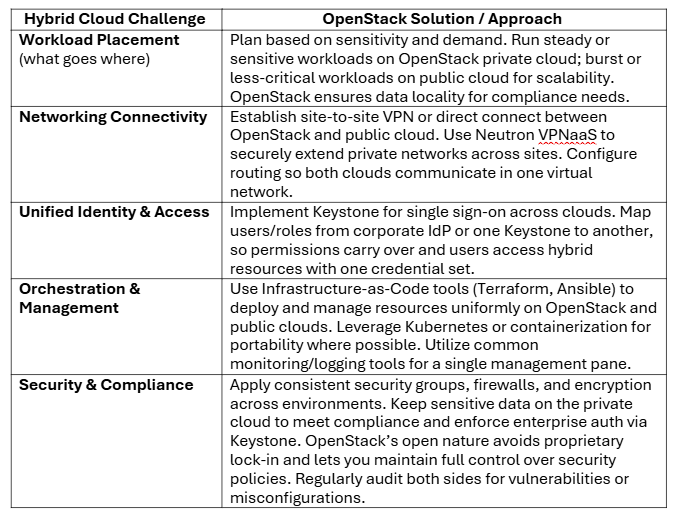
By following these best practices, you can deploy a hybrid cloud that maximizes the strengths of both OpenStack and public platforms—delivering greater control, flexibility, and resilience. This approach lets you run workloads where they fit best, while relying on open standards and modern tooling.
Deploying hybrid clouds with OpenStack is a journey, but one that pays off with agility, cost optimization, and freedom from vendor lock-in. With the right planning and tools your organization can achieve a seamless hybrid experience powered by open-source technology.
Get in touch with our experts today and see how Atmosphere can power your hybrid cloud strategy.
Choose from Atmosphere Cloud, Hosted, or On-Premise.
Simplify your cloud operations with our intuitive dashboard.
Run it yourself, tap our expert support, or opt for full remote operations.
Leverage Terraform, Ansible or APIs directly powered by OpenStack & Kubernetes