

OpenStack
Air gapped cloud upgrades with Atmosphere release manifests
Air gapped cloud on OpenStack: how Atmosphere's digest-pinned release manifests move a release across the boundary, and what the manifest leaves out.
Read field noteField notes / Latest
Engineering notes from operating open infrastructure: the failures, design decisions, and upstream work that make open infrastructure better.
Browse all field notesAir gapped cloud on OpenStack: how Atmosphere's digest-pinned release manifests move a release across the boundary, and what the manifest leaves out.
Read field note
Learn when your team needs OpenStack consulting services and how expert support can help with deployments, migrations, upgrades, and operations.
Read field note
Assess enterprise AI readiness before investing in GPUs. Explore 12 key factors covering data, models, infrastructure, governance, operations, and costs.
Read field note
OpenStack firewall on OVN: security groups filter instance ports and only allow; FWaaS v2 applies ordered allow, deny, reject rules at router ports.
If you lead network or security work, or are part of a platform team from a VMware estate where a perimeter firewall kept the boundaries between segments, you now have an OpenStack firewall decision to make.
On November 2, 2026, we merged a change to our Atmosphere platform that turns on Neutron FWaaS v2 by default for ML2/OVN deployments. We backported it to stable/2025.2 on November 4. Once a cloud runs that code, Horizon shows a Firewall Groups panel, and any user with a project's member role can create firewall groups on router interface ports. When a security review asks for controls between subnets, your team now has a native place to put them. You also have a second rule set to keep in step with the first.
Getting this split wrong is costly. If both teams hold the member role in the same project, the default permissions let them change both rule sets. And rules you write at the router silently skip traffic between instances on the same subnet.
By the end, you can decide for each subnet whether its boundary belongs in security groups or a firewall group, who owns it, and how its instances must be configured.
Here is a typical request. A network team wants one rule: the database subnet accepts TCP 5432 from the application subnet and drops every other routed flow into it, no matter which security groups someone attaches to the database instances later. Security groups can't hold that rule. Their rules only allow traffic, and a second group on a port adds to what the first one permits.
Neutron FWaaS v2 can hold it, because it filters at a different point in the path.
You attach a security group to an individual Neutron port, and different ports on the same instance can carry different groups. Its rules only say what is allowed. A project's default group lets all outgoing traffic out and lets incoming traffic in only from ports in that same group. Every rule you add opens something more.
On ML2/OVN, each rule in a stateful security group (the default) becomes an ACL in the OVN Northbound database with the allow-related action. Replies to an allowed connection come back without needing a rule of their own. Stateless groups use allow-stateless instead. Our security baseline post explains how OVN groups those ACLs into port groups, and our OpenStack security practices guide covers the deny-by-default group setup this post assumes.
FWaaS v2 works with three objects. A rule matches on protocol, addresses and ports, and its action is allow, deny or reject. A policy is an ordered list of rules, with an implicit deny-all at the lowest precedence. A firewall group attaches an ingress policy, an egress policy or both to a set of ports.
The OVN driver needs no agent. Each firewall group becomes an OVN port group, allow rules become allow-stateless ACLs, and deny rules become drop ACLs.
So both controls end up as ACLs in the same Northbound database. Choose between them by where the rule should sit and who will maintain it.
When two instances on the same subnet talk, their traffic never crosses a router interface, so a firewall group on that router never sees it. For an audit, a router policy alone doesn't show segmentation inside a subnet.
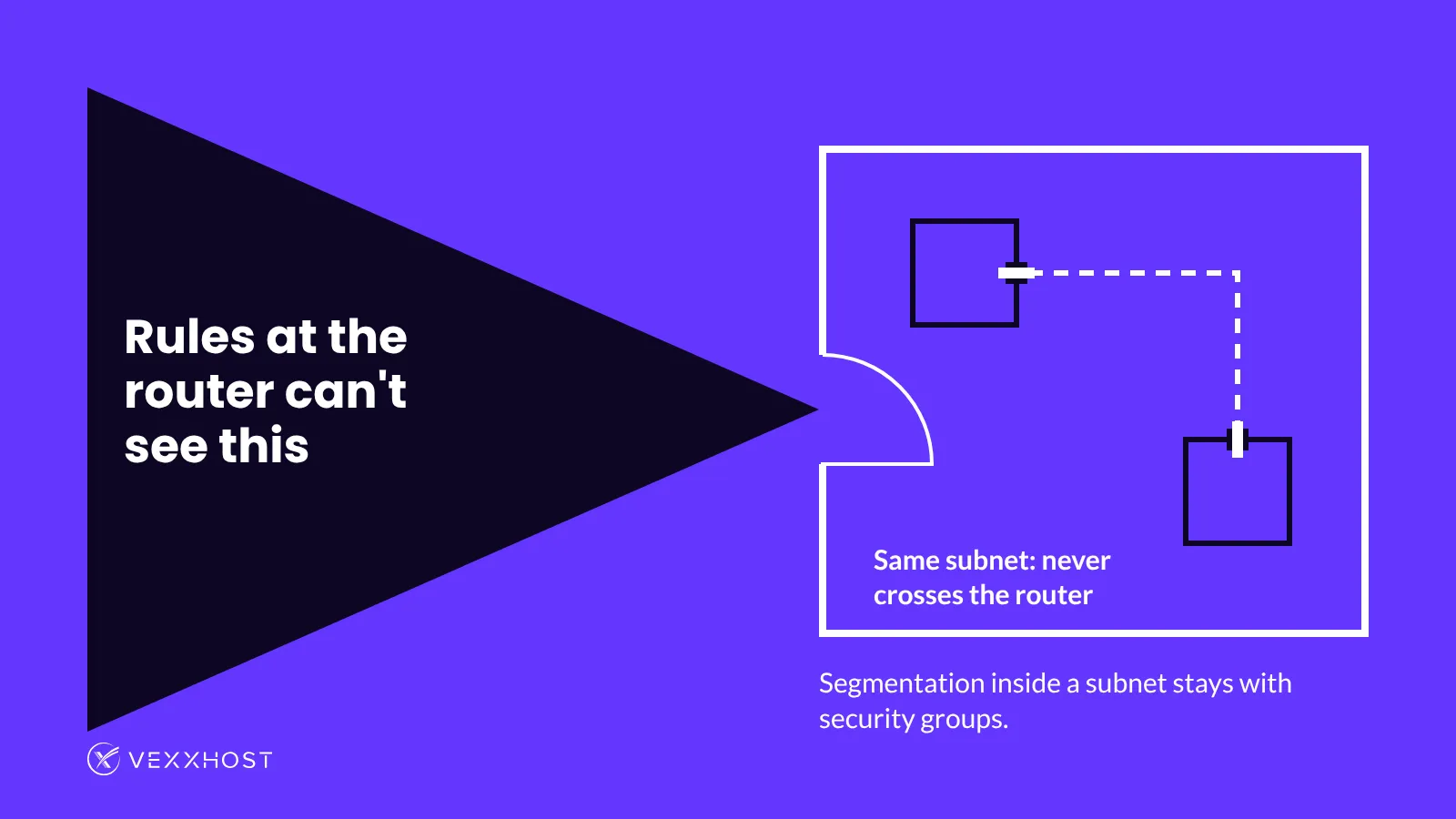
The OVN driver also rejects instance ports, so per-VM firewall policy on OVN stays with security groups.
Logging is the third gap. The upstream drivers comparison shows the Logging API working with the iptables-based L3 agent driver, and the OVN driver doesn't support it. On OVN, that API does not log the router port's firewall decisions. Security group logging covers a different point, the instance port, and our networking service offers it in every edition, from public cloud to on-premise. If an auditor needs a record of a specific flow, add a rule for it on the instance port as well.
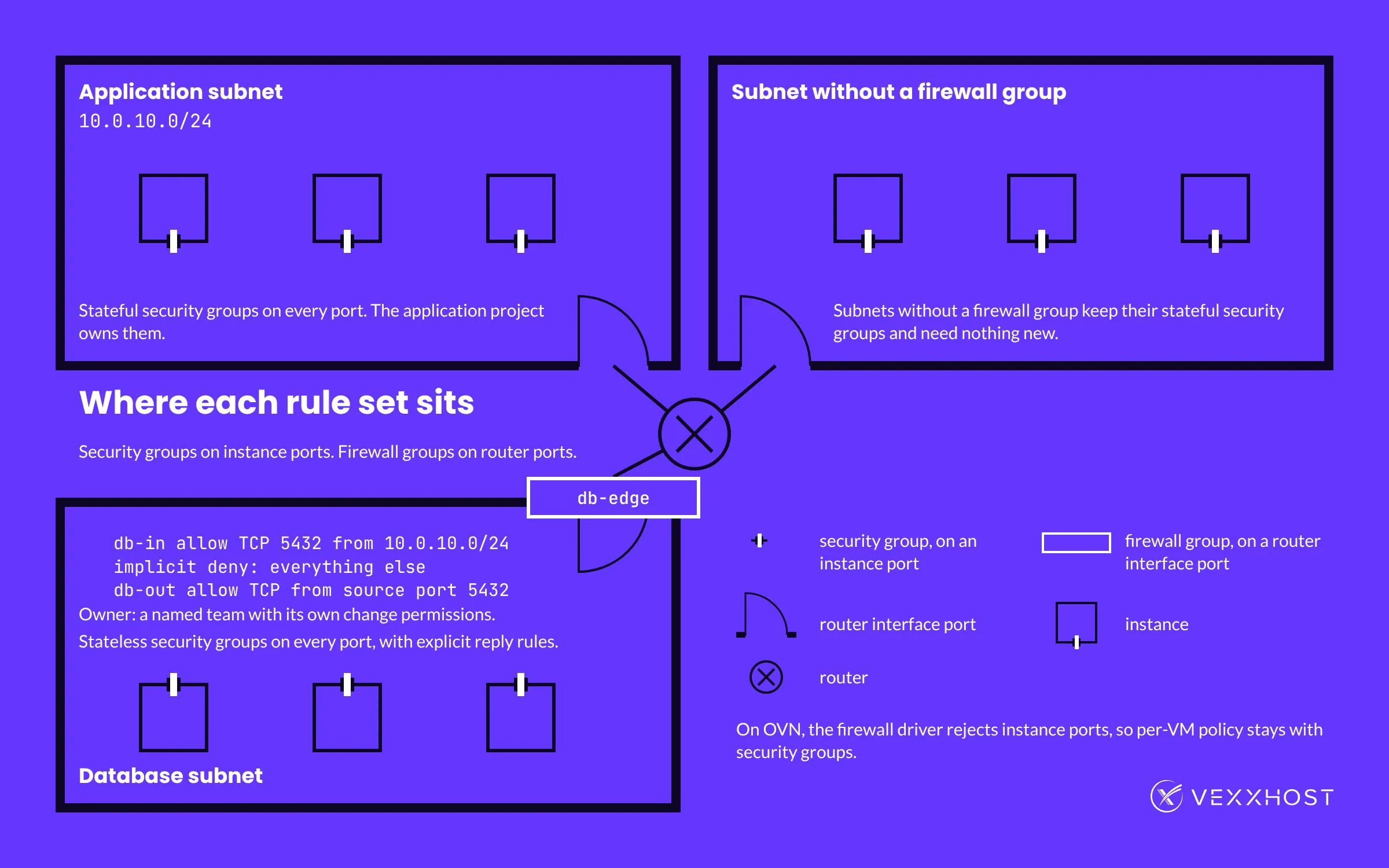
As a security group, the rule is one ingress entry on the database instances: TCP 5432, with the application servers' security group as the remote group. It protects the instances from every source, including neighbors on their own subnet. The application project owns it, and anyone who can edit the project's ports can attach another group next to it.
As a firewall group, the rule sits on the router interface port of the database subnet. The ingress policy allows TCP 5432 from 10.0.10.0/24, and the implicit deny drops everything else. Because the policy is ordered, you can add an exception later, such as dropping one compromised application host, as a deny rule inserted above the allow. Security groups have no way to express that.
On OVN, the firewall group needs one more piece. Its rules are stateless, so the upstream user guide adds an egress policy that allows the replies. The two commands below finish that sequence. Create the db-in policy and its allow rule the same way first.
openstack firewall group rule create --name pg-reply --protocol tcp --source-port 5432 --action allow
openstack firewall group create --name db-edge --ingress-firewall-policy db-in --egress-firewall-policy db-out --port ROUTER_PORT_ID
The db-out policy holds the pg-reply rule. Because the rule is stateless, it matches any TCP packet from source port 5432, whether or not that packet answers a connection the ingress policy allowed.
You can run both, with the security group on the instances and the firewall group at the router. If the firewall group has a separate owner, that owner needs separate permissions too. Under the default policy, any user with the member role in the project can update its firewall groups and policies. Keeping the application team out takes a custom policy or role setup, because the default doesn't provide one. Without separate change permissions, both teams can keep access to both rule sets, even if each has a named owner.
If your team is used to adding a perimeter firewall without touching the hosts behind it, expect one change here. On OVN, a boundary at the router changes how you should configure the instances behind it. The upstream guide does not recommend combining the OVN firewall driver with stateful security groups on VM ports behind the firewall. Conntrack entries from VM port traffic can leak into the firewall rules on the router port. The guide recommends stateless security groups or disabling port security on those VMs.
Each option has a cost.
Stateless security groups keep security group and anti-spoofing filtering on the ports. Like the firewall policy, they need explicit reply rules. The baseline post covers how they behave on OVN.
Disabling port security turns off security group and anti-spoofing rules on those ports, and Neutron makes you remove their security groups first. The router port then becomes the only filter those instances have, and traffic inside their subnet goes unfiltered.
You can also put firewall groups only in front of subnets where one of those trade-offs is acceptable, and leave stateful security groups alone everywhere else.
On ML2/OVN, Atmosphere adds the firewall_v2 service plugin with the OVN firewall driver. Horizon shows a Firewall Groups panel when Neutron advertises the FWaaS v2 extension. ML2/OVS deployments don't get FWaaS by default. If you override Neutron's service plugin list in your Helm values, add firewall_v2 to it yourself.
When this was written, no tagged Atmosphere release contained the change. Check the release notes for your branch before you plan on it, then confirm the extension shows up in the network extension list.
One alternative is to build the same boundary yourself, as a firewall appliance VM routed between subnets. Your network team may already know that tool. Your team then also runs the appliance's high availability, patching and routing. Our earlier post on SDN in Atmosphere describes the OVN and Geneve networking a firewall group now sits in.
If you're moving from VMware, our migration engineers can translate your networks and security groups as part of the move. They can also talk through which rules belong at the router before anything is cut over.
After this change, your organization has to decide which team owns, reviews and changes each firewall group on a router interface. On OVN, adding one also determines how you should configure the security groups behind it.
Work through your subnets one at a time. For each subnet behind a router, decide whether it gets a firewall group. If it does, name the team that owns that group's policies, give that team matching permissions, and choose stateless security groups or disabled port security for the instances inside it. Subnets without a firewall group keep their stateful security groups and need nothing new. You end up with a list of routed subnets, each marked either as having a firewall group with a named owner and a security group mode, or as using stateful security groups only.
Choose from Atmosphere Cloud, Hosted, or On-Premise.
Simplify your cloud operations with our intuitive dashboard.
Run it yourself, tap our expert support, or opt for full remote operations.
Leverage Terraform, Ansible or APIs directly powered by OpenStack & Kubernetes