

OpenStack
The Difference Between Detecting a Problem and Understanding Its Cause
Learn why detecting infrastructure problems is easier than finding their causes, and how monitoring and troubleshooting can improve diagnosis.
Read field noteField notes / Latest
Engineering notes from operating open infrastructure: the failures, design decisions, and upstream work that make open infrastructure better.
Browse all field notesLearn why detecting infrastructure problems is easier than finding their causes, and how monitoring and troubleshooting can improve diagnosis.
Read field note
VEXXHOST commits $100K in infrastructure credits for 2027 to support the OpenInfra Foundation, building on years of contributions to OpenDev.
Read field note
Learn how to monitor cloud spending, forecast costs, and configure budget alerts in VEXXHOST Public Cloud using APIs and CLI tools.
Read field note
Learn how to right-size cloud infrastructure using workload data, CPU, memory, storage, networking, peak demand, capacity planning, and growth.
Cloud infrastructure makes it relatively easy to add resources. Need more compute? Increase the instance size. Running short on storage? Add capacity. Expecting traffic growth? Provision additional infrastructure before demand arrives.
The harder question is whether those resources are actually appropriate for the workload.
Organizations can end up with infrastructure that is significantly larger than necessary because resources were provisioned using estimates, inherited from an older environment, or sized for peaks that rarely occur. The opposite problem is equally important: aggressive optimization can leave applications without enough capacity to perform reliably when demand increases.
Cloud right-sizing addresses both problems.
The goal isn’t to provision the smallest infrastructure possible. It’s to provision the resources a workload needs, with appropriate headroom for performance, reliability, and growth.
Doing that well requires looking beyond VM size and understanding how applications consume compute, memory, storage, and network resources.
Cloud right-sizing is the process of matching infrastructure resources to the actual requirements of workloads.
At the VM level, this may involve changing the amount of CPU or memory assigned to an instance. But effective right-sizing is broader than resizing virtual machines. It can also involve storage performance, network capacity, workload placement, scaling strategies, and the amount of spare capacity maintained for resilience and growth.
In OpenStack, for example, flavors define basic dimensions such as vCPUs, memory, and disk available to an instance. But selecting an appropriate flavor is only one part of determining whether the infrastructure supporting an application is correctly sized.
Right-sizing therefore should not be treated as synonymous with downsizing.
An oversized workload may benefit from fewer resources. An undersized workload may need more. Some workloads may already have the correct compute allocation but require changes elsewhere in the infrastructure.
The objective is alignment rather than reduction.
Overprovisioning often happens gradually rather than through one obviously incorrect decision.
New applications often have limited historical performance data. Infrastructure teams therefore have to estimate expected demand and may deliberately provision conservatively.
That can be a sensible starting point. The problem occurs when the original assumptions are never revisited after real workload data becomes available.
A VM with 16 vCPUs and 64 GB of RAM in an existing virtualization environment may be migrated with exactly the same configuration.
That reduces migration complexity, but the original VM may itself have been oversized. Treating its existing specification as a permanent requirement can carry years of accumulated capacity assumptions into the new cloud.
Some applications experience short but important demand spikes. Providing additional capacity for those periods may be necessary, particularly when scaling cannot happen quickly enough.
The relevant question is whether permanent capacity is the appropriate way to handle the peak.
Infrastructure teams may intentionally provide extra capacity because the operational impact of running short is greater than the cost of unused resources.
That is not necessarily waste. Capacity can provide valuable resilience.
Applications are retired, databases move, traffic patterns change, and new services replace old ones. Without periodic review, infrastructure allocations can remain tied to requirements that no longer exist.
These are reasons to investigate resource usage, not automatic reasons to reduce it.
Right-sizing becomes counterproductive when cost reduction takes priority over application requirements.
Insufficient compute resources can create CPU contention or sustained saturation. Inadequate memory can cause increased swapping, application failures, or other forms of memory pressure. Storage that cannot deliver the necessary IOPS or throughput can increase application latency even when CPU and memory appear healthy.
Network constraints can produce similar symptoms.
The effects often become most visible during demand spikes. An application may operate normally most of the day but deteriorate rapidly when traffic increases because there is insufficient capacity to absorb the peak.
Right-sizing therefore requires finding a workable balance between efficiency and operational headroom.
Before asking whether an eight-vCPU VM should become a four-vCPU VM, ask what the workload running on it does.
Useful questions include:
A stateless web tier with variable traffic may have very different infrastructure requirements from a transactional database, even when their average CPU utilization appears similar.
Likewise, a batch-processing VM that consumes substantial CPU for two hours every night should not necessarily be downsized because its 24-hour average utilization appears low.
Averages describe workload behavior only partially. Right-sizing requires understanding the distribution and timing of demand as well.
CPU utilization is an important signal, but it should not be interpreted in isolation.
Persistently low utilization can indicate that fewer vCPUs may be sufficient. However, teams should also examine peak utilization, workload latency, processing deadlines, CPU contention, and how frequently bursts occur.
Consider a VM that averages 20% CPU utilization but reaches high utilization during an important hourly processing job. Reducing its CPU allocation could make the average utilization figure look more efficient while causing that job to miss its required completion window.
Memory needs to be evaluated independently.
Look beyond how much RAM has been allocated and consider:
Applications such as databases may intentionally use available memory for caching. High memory consumption in that case is not necessarily evidence that the VM needs more RAM, just as unused allocated memory does not automatically prove that it needs less.
The application’s behavior provides the context needed to interpret the metric.
Storage is one of the easiest areas to misinterpret during infrastructure planning.
A workload's storage requirement has several dimensions:
Capacity tells you how much data can be stored.
IOPS describes how many input/output operations the storage system can process over a given period.
Throughput describes the volume of data that can be transferred.
Latency measures how long individual storage operations take to complete.
These requirements are related, but they are not interchangeable.
Imagine a database using only 500 GB of a multi-terabyte volume. Looking only at capacity could suggest that storage is significantly overprovisioned.
But if the database generates many latency-sensitive random I/O operations, reducing or changing the storage configuration without considering performance characteristics could make the application slower despite leaving plenty of free disk space.
The reverse is also possible: an application may need substantial storage capacity but generate relatively modest I/O.
A useful storage review should therefore examine both how much storage the workload needs and how it uses that storage.
For storage-intensive applications, measurements should include latency, IOPS, throughput, queueing behavior where available, and changes during peak workload periods.
Compute right-sizing can also be misleading when networking is ignored.
Applications increasingly communicate across multiple services, databases, APIs, and infrastructure components. Their performance may therefore depend as much on communication patterns as on the resources available inside individual VMs.
Teams should consider:
A distributed application, for example, may have modest CPU requirements while generating substantial east-west network traffic between services.
Adding CPU will not solve a network bottleneck.
Right-sizing should therefore evaluate the complete path supporting a workload rather than treating each VM as an isolated unit.
Infrastructure should rarely be sized solely around average utilization.
Teams also need to account for peak demand, expected growth, resilience requirements, maintenance events, and the time required to add capacity.
The correct amount of headroom depends on the architecture.
A stateless service capable of rapidly adding instances may need a different capacity strategy from a stateful database that requires carefully planned vertical scaling. An application with highly predictable seasonal peaks can be planned differently from one with sudden, unpredictable demand.
Growth forecasts matter as well.
If infrastructure procurement or private cloud expansion takes months, capacity planning needs to look farther ahead than it would for resources that can be provisioned rapidly.
There is no universal percentage of spare capacity that makes infrastructure correctly sized.
Headroom should instead reflect:
This turns spare capacity from an arbitrary buffer into an architectural decision.
The following conditions can justify a closer review:
None of these signals should trigger automatic downsizing.
They indicate that the workload deserves further measurement and analysis.
Indicators of insufficient infrastructure can include:
The important step is correlation.
A high metric is more useful when teams can connect it to workload behavior and application performance.
Right-sizing works best as a continuous operational cycle:
Collect representative utilization and performance data across CPU, memory, storage, networking, and the application itself.
The measurement window should capture normal operation as well as important peaks, batch jobs, seasonal events, and other relevant workload cycles.
OpenStack's Telemetry services, for example, are designed to collect infrastructure measurements through polling and service notifications that can then be used by analytical tooling. The specific monitoring architecture will depend on the environment.
OpenStack's Telemetry service documentation explains how infrastructure measurements can be collected through polling and service notifications.
Look for patterns rather than isolated metrics.
Determine when resources are used, which resources constrain the application, whether peaks are predictable, and how infrastructure metrics correlate with application performance.
Change resources based on evidence.
That could mean reducing a VM size, increasing memory, selecting a different storage configuration, changing workload placement, or revisiting how an application scales.
Right-sizing does not require every adjustment to make infrastructure smaller.
Where possible, validate proposed changes before applying them broadly to production.
Performance testing should reflect realistic workload behavior, particularly peak demand and resource-intensive operations.
After making a change, verify that the workload continues to meet performance and reliability requirements.
Watch for secondary effects. Reducing memory, for example, may increase storage I/O if an application can no longer cache as effectively.
Workloads evolve.
Growth, software changes, traffic patterns, new dependencies, and infrastructure changes can all alter resource requirements. Regular reassessment prevents yesterday's correct configuration from becoming tomorrow's oversized or undersized one.
Measure → Analyze → Adjust → Test → Monitor → Repeat
That cycle is more valuable than treating right-sizing as a one-time cost optimization project.
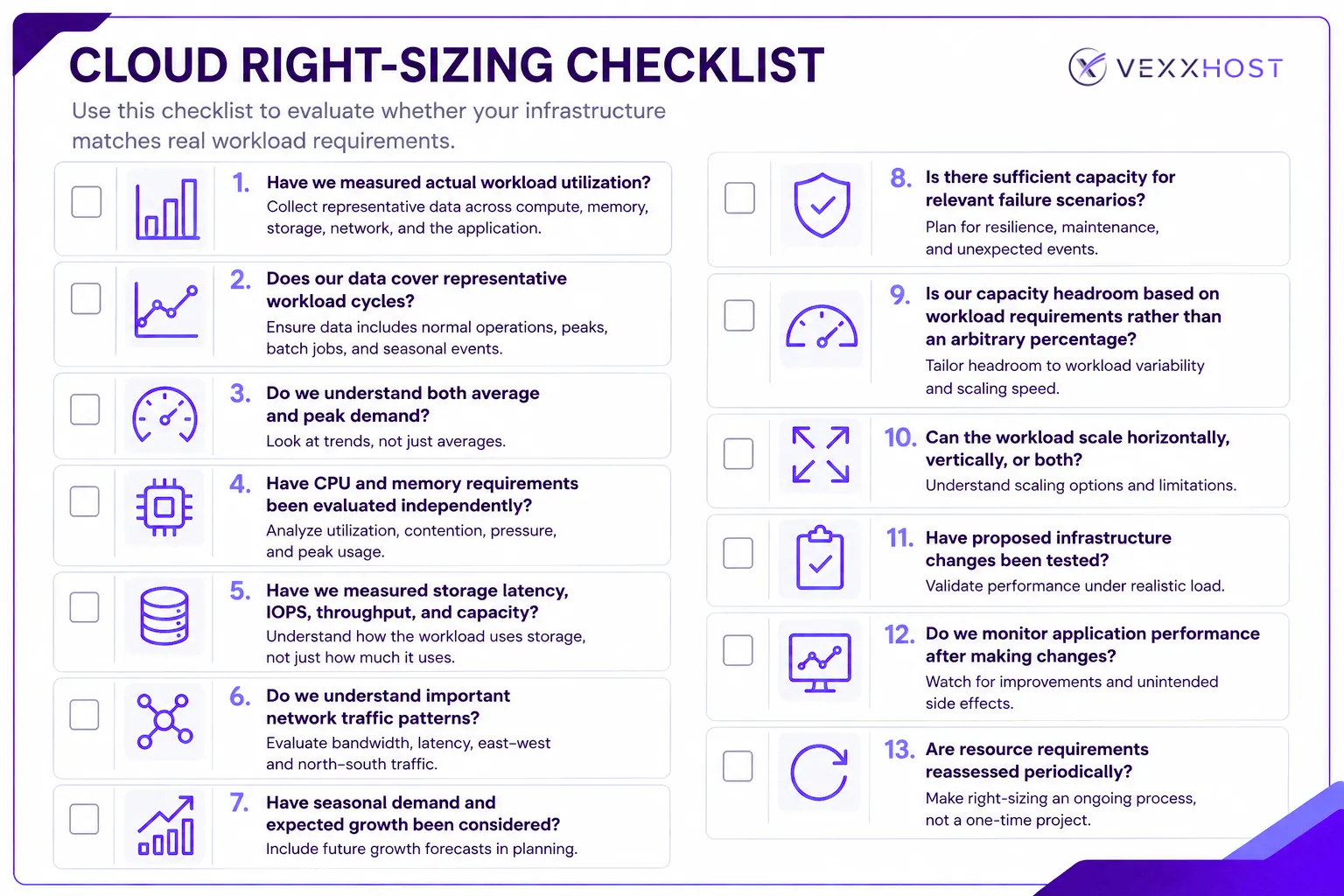
Sometimes a right-sizing exercise reveals that VM configuration was not the primary problem.
Architecture, storage design, network topology, workload placement, scaling behavior, and the underlying cloud platform all influence infrastructure efficiency.
That broader view becomes particularly important when organizations are migrating workloads or designing private cloud infrastructure. Instead of asking only how many vCPUs and gigabytes of RAM existing VMs consume, teams can use the opportunity to reassess what those workloads require and how the cloud should accommodate future demand.
VEXXHOST designs, deploys, and operates OpenStack-based infrastructure across public and private cloud environments. Organizations reviewing their infrastructure requirements can explore VEXXHOST's OpenStack cloud services, including Public Cloud and Private Cloud, or work with its infrastructure experts when evaluating broader architecture and operational requirements.
Cloud right-sizing isn't about minimizing resources.
It's about matching infrastructure to real workload requirements while preserving the performance, resilience, and capacity the organization needs.
That requires more than looking for VMs with low CPU utilization. Effective right-sizing considers CPU, memory, storage performance, network behavior, workload peaks, scaling capabilities, failure scenarios, and expected growth together.
Most importantly, it is an ongoing process.
Measure how workloads behave, analyze what they require, make evidence-based adjustments, validate the results, and revisit those decisions as the environment changes.
If you're evaluating or redesigning OpenStack infrastructure, explore VEXXHOST's cloud services or talk to the VEXXHOST team about your infrastructure requirements.
Choose from Atmosphere Cloud, Hosted, or On-Premise.
Simplify your cloud operations with our intuitive dashboard.
Run it yourself, tap our expert support, or opt for full remote operations.
Leverage Terraform, Ansible or APIs directly powered by OpenStack & Kubernetes