

Kubernetes
SaaS Infrastructure: Shared Kubernetes, Clusters or VMs?
Compare shared Kubernetes, tenant namespaces, dedicated clusters, and VMs for SaaS infrastructure. Learn how isolation, costs, and operations shape your choice.
Lire la noteNotes de terrain / Dernières nouvelles
Des notes d’ingénierie issues de l’exploitation d’infrastructures ouvertes : pannes, décisions de conception et travail upstream qui améliorent l’infrastructure ouverte.
Parcourir toutes les notesCompare shared Kubernetes, tenant namespaces, dedicated clusters, and VMs for SaaS infrastructure. Learn how isolation, costs, and operations shape your choice.
Lire la note
Learn why backups alone don't guarantee recovery and how RTO, RPO, infrastructure dependencies, and recovery testing improve disaster readiness.
Lire la note
Compare private AI inference, managed endpoints, and public AI APIs. Learn when data control, latency, model flexibility, and cost justify a change.
Lire la note
Learn how to safely upgrade production GPU infrastructure across NVIDIA drivers, CUDA, Kubernetes, firmware, containers, and AI workloads.
A security update requires a new NVIDIA driver. Your Kubernetes release is approaching the end of its support window. One training image still depends on the existing environment, while a production inference service cannot afford to lose half its GPU capacity during maintenance.
This is where GPU infrastructure upgrades become an operational problem rather than a package-management task.
Production GPU environments combine hardware firmware, Linux, NVIDIA drivers, container tooling, Kubernetes components, CUDA libraries, AI frameworks, monitoring, and application images. Each layer can have its own lifecycle, but they cannot always be changed independently.
The safest way to upgrade production GPU infrastructure is to treat the entire environment as a coordinated compatibility lifecycle: inventory the stack, define a supported target state, validate dependencies, test representative workloads, upgrade a limited pool first, maintain workload capacity, and preserve a tested rollback path.
A simplified dependency stack might look like this:
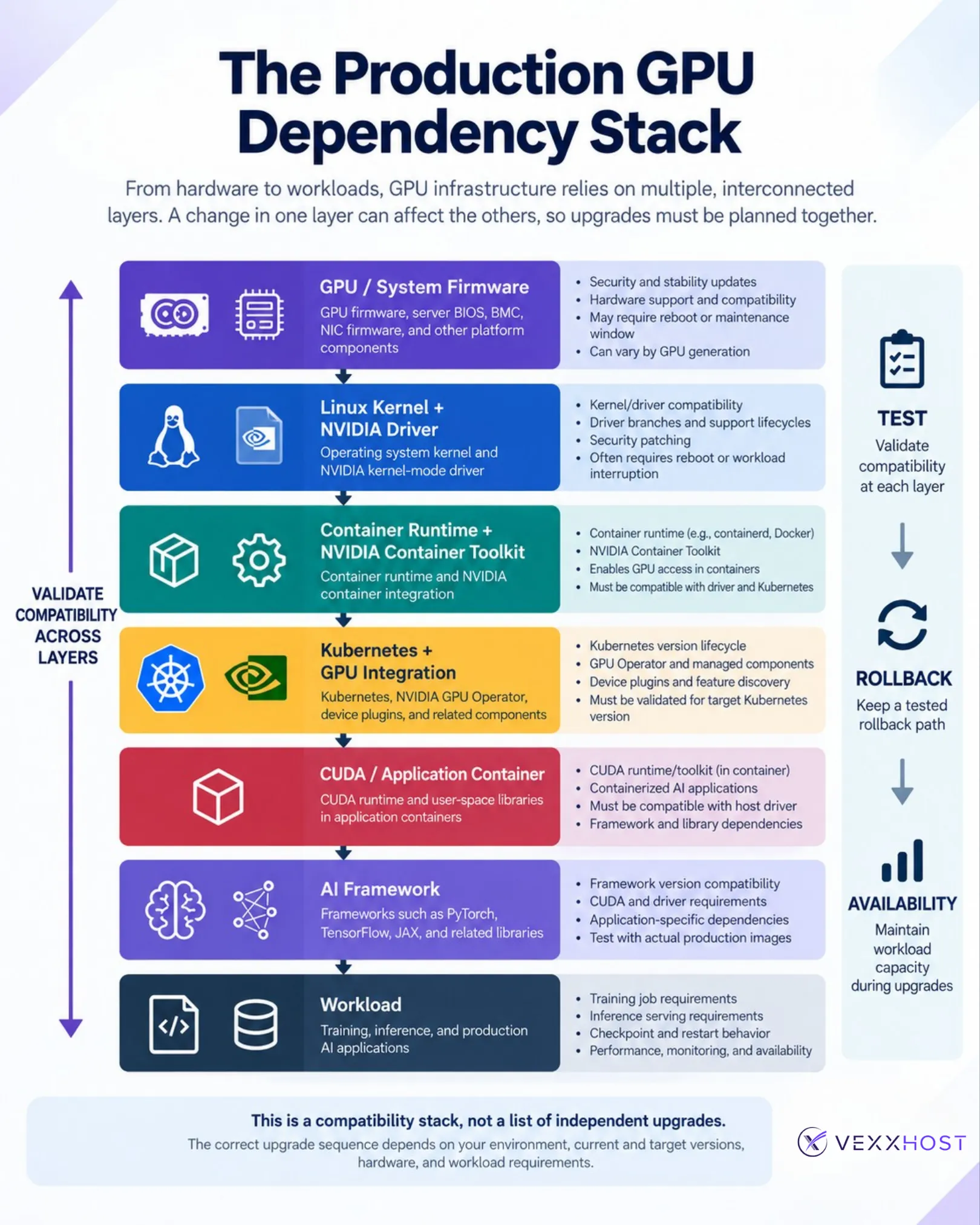
The arrows should not be interpreted as one mandatory upgrade order. They show where compatibility boundaries exist.
For example, changing the kernel can affect the NVIDIA kernel modules. Upgrading Kubernetes may require verifying that the deployed NVIDIA GPU Operator remains supported. Moving an application to a newer CUDA runtime can introduce a minimum driver requirement.
One particularly important distinction is between the host NVIDIA driver and CUDA user-space components.
Containerized AI applications commonly package CUDA runtime libraries and framework dependencies inside their application image. The host does not necessarily need an identical installation of that CUDA Toolkit. The container still relies on the host NVIDIA driver to communicate with the GPU, and that driver must satisfy the compatibility requirements of the CUDA workload.
NVIDIA documents backward compatibility, minor-version compatibility, and forward-compatibility mechanisms with specific constraints. Those rules change across CUDA generations, so production decisions should be checked against current NVIDIA documentation rather than inferred from version numbers alone.
Lifecycle management begins below Kubernetes.
GPU firmware, server BIOS, BMC firmware, NIC firmware, and other platform components may receive security, stability, or hardware-support updates. Depending on the platform and update, applying them may require a device reset, node reboot, or maintenance window.
Hardware generation matters too. A mixed fleet should not automatically share one firmware baseline simply because all nodes run the same workload.
The NVIDIA driver includes kernel-facing components, which means kernel and driver changes need to be qualified together.
A kernel patch may require a compatible driver module to be loaded or rebuilt, and some changes require rebooting the node. Conversely, a driver update can require GPU clients to stop while the previous kernel modules are unloaded.
When the GPU Operator manages containerized NVIDIA drivers, NVIDIA specifically treats driver upgrades as a special process because active clients need to be disabled before the modules can be replaced. Drivers preinstalled on the host are outside that GPU Operator driver lifecycle.
This is also why “install the newest driver” is not a production strategy. Teams need a driver branch supported by their hardware, operating system, CUDA workloads, and platform tooling.
The CUDA Toolkit, CUDA runtime, NVIDIA driver, NVIDIA Container Toolkit, and application framework are separate components.
In a containerized environment, a useful responsibility split is:

The exact boundary depends on how the environment is built, but this model helps explain why successfully loading a GPU driver does not prove that an application image will work.
Test the actual production images, not only nvidia-smi or a basic CUDA sample.
Kubernetes provides a framework for exposing specialized hardware through device plugins; it does not create, virtualize, or automatically partition GPU capacity itself.
The NVIDIA GPU Operator can automate several components needed on GPU nodes, including drivers in supported deployment models, the NVIDIA Container Toolkit, Kubernetes device plugins, GPU Feature Discovery, and DCGM-based monitoring.
That creates another lifecycle boundary.
Upgrading the GPU Operator is not necessarily the same operation as upgrading every operand it manages. NVIDIA publishes a component matrix for each Operator release, and driver upgrades have additional controls because of their kernel-level behavior. As of September 2026, NVIDIA’s support matrix also illustrates how Operator releases themselves move through supported, deprecated, and end-of-support states.
Teams using VEXXHOST Managed Kubernetes with GPU worker pools should therefore include GPU components in the cluster lifecycle plan rather than treating them as an unrelated add-on.
The individual update is often less dangerous than the interaction between updates.
Consider these production scenarios:
The operational question is therefore not simply, “Did the component upgrade succeed?”
It is, “Does the complete production workload still behave correctly after the new stack is in place?”
Before making changes, document the versions you are running today and the versions you intend to move to across the main layers: firmware, Linux kernel, NVIDIA driver, container tooling, Kubernetes GPU components, CUDA runtime, and workload images.
Then validate the target combination against current NVIDIA, Kubernetes, operating-system, and framework documentation.
The goal is simple: avoid upgrading each component in isolation and discovering compatibility problems only after production workloads return to service.
For mixed GPU fleets, validate each hardware class separately rather than assuming one successful test covers the entire environment.
There is no single correct order for every GPU cluster. A host-installed driver model, Operator-managed environment, mixed GPU fleet, and bare-metal training cluster can require different sequences.
A practical production process is:
For replicated Kubernetes applications, PodDisruptionBudgets can constrain voluntary pod disruptions during drains. They are not additional GPU capacity, however. A PDB can also prevent a drain from progressing when the required number of healthy replicas cannot be maintained.
That means disruption controls and capacity planning have to work together.
“Rollback available” should mean more than knowing which package version was installed previously.
Preserve, where appropriate:
Then test the rollback procedure before the production window.
GPU nodes should not all receive the same maintenance policy simply because they contain the same accelerator.
Training maintenance is dominated by job continuity and restart cost.
A distributed job may occupy multiple GPUs or nodes for hours or days. Removing one worker can terminate the full job depending on the training architecture.
Before maintenance, confirm:
Inference maintenance is dominated by serving availability.
Teams need to understand:
A production inference service might tolerate rolling maintenance easily with sufficient replicas and spare capacity. The same maintenance pattern could be unacceptable for a tightly coupled distributed training job.
For a broader treatment of this distinction, see VEXXHOST’s guide to AI infrastructure reliability, recovery, and operations.
Clusters containing several GPU generations create additional validation paths.
Use separate node pools, hardware-class labels, or equivalent scheduling controls so workloads can be placed onto explicitly supported accelerators.
Where requirements differ substantially, maintain a validated baseline for each hardware class:
GPU class → firmware → driver → platform components → validated workload images
A successful upgrade on one accelerator generation should not be considered validation for every GPU in the fleet.
Reducing unnecessary hardware and software variation can also simplify capacity planning, troubleshooting, and future upgrades.
The stack crosses organizational boundaries.
Infrastructure teams may own firmware, Linux, nodes, and host drivers. Platform teams may own Kubernetes, the container runtime, GPU Operator, and worker pools. Security teams may establish patch deadlines. MLOps and application teams still need to verify that frameworks, models, and application containers operate correctly.
Define explicitly:
Without clear ownership, every individual layer can appear healthy while the production service remains broken.
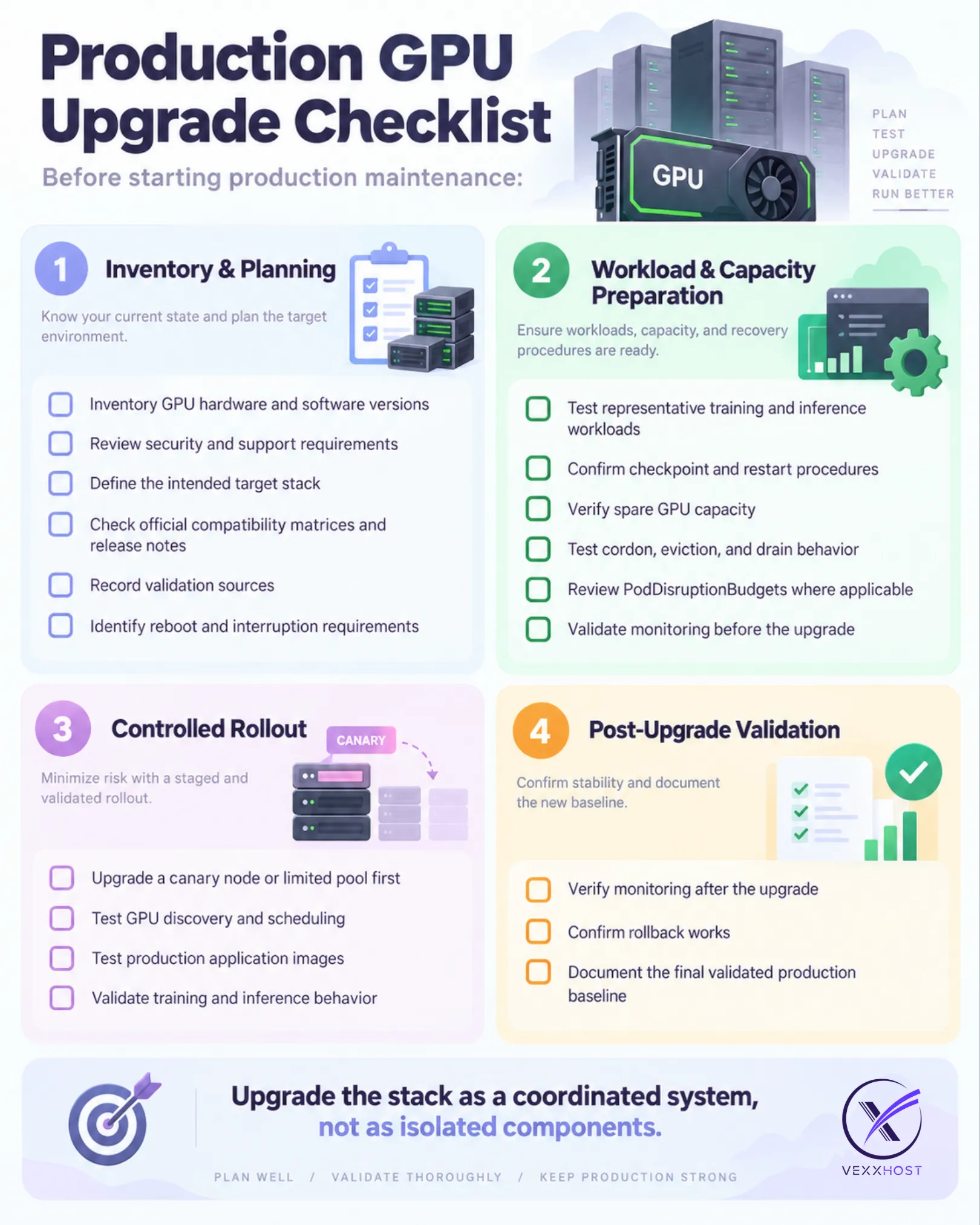
Production GPU operations require more than accelerator capacity. The lifecycle also reaches the cloud or bare-metal layer, Kubernetes, networking, storage, monitoring, and the software required to expose GPUs safely to workloads.
VEXXHOST GPU Infrastructure supports dedicated accelerated infrastructure hosted by VEXXHOST or deployed on customer premises, with support or managed operations available around the platform. VEXXHOST’s current GPU offering explicitly includes Day 2 monitoring, support, upgrades, and managed operations alongside compute, storage, networking, and workload-access considerations.
Organizations can combine this with Managed Kubernetes, OpenStack infrastructure, or managed infrastructure services depending on which operational layers they want to own internally. VEXXHOST’s broader AI infrastructure portfolio also connects GPU infrastructure to training, inference, Kubernetes, and AI operations.
The objective is not to outsource every GPU upgrade. It is to establish a production environment where compatibility, capacity, maintenance, and recovery are managed deliberately.
Planning a GPU infrastructure deployment or lifecycle upgrade? Talk to VEXXHOST about the infrastructure your AI workloads need to stay supportable in production.
Choose from Atmosphere Cloud, Hosted, or On-Premise.
Simplify your cloud operations with our intuitive dashboard.
Run it yourself, tap our expert support, or opt for full remote operations.
Leverage Terraform, Ansible or APIs directly powered by OpenStack & Kubernetes