

GPUs
VEXXHOST Attends ALL IN Reception at Scale AI in Montréal
VEXXHOST attended the ALL IN reception at Scale AI in Montréal, held alongside the Canada–EU Summit, highlighting AI innovation and technology cooperation.
Lire la noteNotes de terrain / Dernières nouvelles
Des notes d’ingénierie issues de l’exploitation d’infrastructures ouvertes : pannes, décisions de conception et travail upstream qui améliorent l’infrastructure ouverte.
Parcourir toutes les notesVEXXHOST attended the ALL IN reception at Scale AI in Montréal, held alongside the Canada–EU Summit, highlighting AI innovation and technology cooperation.
Lire la note
Learn why detecting infrastructure problems is easier than finding their causes, and how monitoring and troubleshooting can improve diagnosis.
Lire la note
VEXXHOST commits $100K in infrastructure credits for 2027 to support the OpenInfra Foundation, building on years of contributions to OpenDev.
Lire la note
Compare dedicated GPUs, MIG, vGPU, and time-slicing for enterprise AI. Learn how isolation, performance, utilization, and workload type affect GPU allocation.
As GPU environments grow, one of the first architecture questions is how much of each accelerator a workload should receive.
Giving every workload a full GPU is simple and predictable, but it can leave expensive capacity idle. Sharing GPUs more aggressively can improve utilization, but it can also introduce contention, latency variability, capacity fragmentation, and operational complexity.
The right question is not whether dedicated GPUs are better than shared GPUs. It is what level of isolation each workload actually requires.
That decision depends on workload behavior, GPU memory demand, latency and throughput targets, tenancy, utilization patterns, operational maturity, and economics. GPU allocation is therefore an infrastructure design decision, not just a hardware purchasing decision.
A full GPU can be assigned directly to one virtual machine or workload, commonly through PCI passthrough. In OpenStack, Nova can expose physical PCI devices such as GPUs to instances.
This improves predictability and simplifies troubleshooting, but the device remains unavailable to other workloads when underused. Dedicated GPUs fit workloads that need most of the device, predictable performance, or sustained multi-GPU access.
NVIDIA Multi-Instance GPU, or MIG, can divide supported GPUs into hardware-isolated GPU instances with dedicated portions of compute and memory resources.
MIG can improve density for smaller predictable workloads while providing stronger resource isolation than software-only sharing. It is not supported on every NVIDIA GPU, and available partition sizes depend on the hardware profile. NVIDIA documents supported configurations and hardware in its MIG User Guide.
vGPU exposes virtual GPU resources to multiple virtual machines through a virtualization layer.
This can suit multi-user virtualized environments, but vGPU is not the same as MIG. Behavior depends on the GPU, hypervisor, profile, drivers, licensing, and platform support. Organizations considering this approach should validate their exact stack against the relevant NVIDIA vGPU documentation.
Time-slicing allows multiple workloads to take turns using the same physical GPU.
This can improve utilization for intermittent jobs or development environments, but it does not provide MIG-style memory and fault isolation. Workloads still share the device and can affect one another through contention. NVIDIA makes this distinction explicitly in its GPU time-slicing documentation.
Dedicated GPUs generally maximize predictability. Shared GPUs can improve utilization. But average utilization alone should not determine the architecture.
A GPU that averages 30% utilization is not necessarily 70% wasted.
A workload may still require:
Once workloads share a GPU, they can interact through compute demand, memory pressure, memory bandwidth, queueing, and concurrency.
For inference, this may appear as higher tail latency; for training, as longer or less consistent job completion.
The better question is: What happens when another workload competes for the same resource?
For more on this, see VEXXHOST's guide to GPU utilization and idle capacity.
Training and inference frequently produce different isolation requirements.
Large training jobs often have high sustained GPU utilization, large memory footprints, long runtimes, multi-GPU communication, and sensitivity to interruptions or stragglers. For these workloads, dedicated GPUs or dedicated GPU groups often make operational sense.
Fine-tuning, experimentation, and smaller training tasks may still run efficiently on partitioned or shared capacity.
Inference is often more variable, combining bursty traffic, multiple models, batch jobs, and latency-sensitive APIs. Smaller predictable models may fit MIG partitions; intermittent development inference may tolerate time-slicing; large or strict-latency services may still need dedicated resources.
The workload category matters, but the real decision comes from memory demand, concurrency, latency targets, and utilization behavior. VEXXHOST covers the broader distinction in AI Workloads on Kubernetes: Training vs. Inference Infrastructure Requirements.
GPU isolation should be evaluated across four dimensions.
Performance isolation: Can one workload affect another workload's latency or throughput?
Resource isolation: Can one workload consume memory or compute capacity another workload expects?
Tenant isolation: Are different customers, teams, business units, or trust boundaries sharing the infrastructure?
Operational isolation: Can one workload's driver, runtime, maintenance requirement, or failure affect another?
A technically shareable GPU is not automatically an operationally appropriate one. GPU isolation should still be considered alongside VM or container isolation, identity, network controls, storage, and operations.
This is particularly important when designing private cloud infrastructure that will host multiple teams, customers, or workload classes.
Organizations consider GPU sharing because accelerator capacity is expensive and many AI workloads do not consume a full GPU continuously.
Sharing can increase useful workload density, but maximizing utilization is not the same as minimizing total cost.
Hidden costs can include scheduling complexity, capacity fragmentation, monitoring, troubleshooting, compatibility constraints, vGPU licensing where applicable, and platform-engineering overhead.
The cheapest GPU architecture on paper is not necessarily the cheapest architecture to operate.
This is why utilization, operator effort, performance risk, and business criticality should be evaluated together.
Once GPU infrastructure serves multiple teams or customers, allocation becomes a resource-management problem. A mature environment may need:
Without these controls, high sharing can look efficient while becoming unpredictable. For production services, reserving capacity may matter more than maximizing average utilization.
Kubernetes can orchestrate GPU workloads, but Kubernetes itself is not the GPU isolation mechanism.
It uses device plugins to expose accelerators as schedulable resources. The official Kubernetes GPU scheduling documentation explains how vendor device plugins make GPU resources available to workloads.
A GPU-aware design may use:
Kubernetes does not create hardware isolation by itself; the underlying GPU configuration determines whether a workload receives a full GPU, MIG instance, vGPU, or shared access.
For teams that want Kubernetes operated as part of the platform, VEXXHOST provides Managed Kubernetes across hosted and customer-controlled environments.
OpenStack addresses GPU allocation at the virtual infrastructure layer.
Nova can expose GPUs to instances through PCI passthrough, while flavors, Placement resource classes, traits, host aggregates, quotas, and dedicated compute pools can help express and schedule GPU-backed instance requirements.
OpenStack does not automatically enable every sharing model. vGPU and mediated-device capabilities depend on hardware, hypervisor, vendor software, and deployment architecture.
OpenStack and Kubernetes can complement one another: OpenStack can manage infrastructure-level tenancy and GPU placement while Kubernetes schedules containerized AI workloads above it.
For organizations building this type of environment, VEXXHOST provides OpenStack-based private cloud infrastructure.
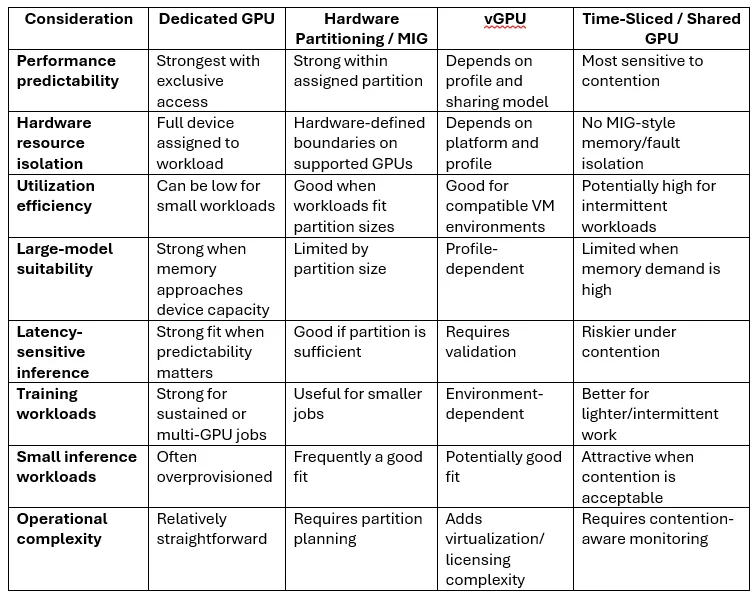
Dedicated GPUs are often preferable when:
Hardware partitioning may be preferable when:
Software-level sharing may be appropriate when:
Real environments often use several models at once.
Use these questions in an infrastructure architecture review:
If these questions are unanswered, choosing the sharing technology is probably premature.
Mature AI platforms rarely have one workload profile.
A practical environment may use dedicated GPU nodes for large training, partitioned GPUs for predictable inference, shared capacity for development, and separate pools for production and experimentation.
The infrastructure layer should allow workloads to be placed according to their requirements rather than forcing every workload into the same allocation model.
That same workload-first principle is central to VEXXHOST GPU Infrastructure, which can be combined with Managed Kubernetes for containerized AI workloads or VEXXHOST AI Inference when the requirement is a managed model-serving layer rather than direct GPU operations.
Organizations evaluating the broader infrastructure model can also compare VMs, bare metal, Kubernetes, and managed inference before deciding where GPU isolation should sit in the stack.
The objective is not to maximize GPU utilization at any cost, nor to dedicate a GPU to every workload.
The goal is to give each workload the performance, isolation, and flexibility it actually requires while keeping the infrastructure operationally and economically sustainable.
If your organization is deciding how GPU capacity should be allocated, isolated, scheduled, and operated across AI workloads, VEXXHOST can help design the infrastructure around those requirements.
Choose from Atmosphere Cloud, Hosted, or On-Premise.
Simplify your cloud operations with our intuitive dashboard.
Run it yourself, tap our expert support, or opt for full remote operations.
Leverage Terraform, Ansible or APIs directly powered by OpenStack & Kubernetes