
OpenStack
Air gapped cloud upgrades with Atmosphere release manifests
Air gapped cloud on OpenStack: how Atmosphere's digest-pinned release manifests move a release across the boundary, and what the manifest leaves out.
Lire la noteNotes de terrain / Dernières nouvelles
Des notes d’ingénierie issues de l’exploitation d’infrastructures ouvertes : pannes, décisions de conception et travail upstream qui améliorent l’infrastructure ouverte.
Parcourir toutes les notesAir gapped cloud on OpenStack: how Atmosphere's digest-pinned release manifests move a release across the boundary, and what the manifest leaves out.
Lire la note
Assess enterprise AI readiness before investing in GPUs. Explore 12 key factors covering data, models, infrastructure, governance, operations, and costs.
Lire la note
Explore on-premises Kubernetes architecture, costs, and operational challenges. Learn when managed Kubernetes makes sense for production workloads.
Lire la note
Air gapped cloud on OpenStack: how Atmosphere's digest-pinned release manifests move a release across the boundary, and what the manifest leaves out.
Infrastructure leads and platform teams running OpenStack at a defense enclave, a regulated production network, an industrial control site or a remote facility without a dependable link all share one constraint: the cloud has no route to the internet. You install an air gapped cloud once and upgrade it many times, and every upgrade means getting images across the boundary again. Every container image arrives on approved media, and someone has to sign off on what crosses.
The pressure comes when the first security fix or release has to cross. Since October 27, 2026, every release of our Atmosphere OpenStack platform ships with a digest-pinned release manifest, on all seven stable branches from zed to 2025.2. That manifest is a fixed starting point for planning each crossing.
Two risks follow: a stalled upgrade and an image that changed after you tested it. If an upgrade stops because one image can't be pulled, services are left split across versions, and nobody inside the site can fetch the missing piece. And an image pulled by tag can change upstream after you tested it, so the evidence your reviewers signed no longer matches what runs.
This post covers what to put on the transfer media for each release, what the manifest leaves out, and who does each step on each side of the air gap.
Every Atmosphere release tagged since October 27, 2026 comes with a release manifest. Each image entry in it is pinned by sha256 digest. The manifest for v7.11.0 has 231 image entries. For a disconnected site, the manifest is the starting point for the transfer list. Images pulled by their approved digests are the exact bytes your change board approved. Inventory overrides, a different Kubernetes version and kubeadm's own pulls change what gets pulled, and the next section covers how to handle each.
Build the transfer media on a host with internet access. Download the atmosphere-release tool for Linux or macOS from the release assets, log in to the source registries, and write the release to a directory on the media:
$ atmosphere-release mirror ghcr.io/vexxhost/atmosphere-release:v7.11.0 \
    --to-dir /media/atmosphere-v7.11.0
The tool copies every image, with every platform, plus the manifest onto the media. Because each image is copied whole, its digest stays the one your board approved, and the tool checks each digest after copying.
That takes disk. Many upstream images carry several architectures, and our deployment docs warn that the copy can take a lot of space. Size the media before you book the transfer window.
You have to add some images by hand. kubeadm pulls the Kubernetes control plane images, etcd and CoreDNS by tag for your Kubernetes version. The control plane images are in the manifest. Pass etcd and CoreDNS to the export as extra images, using the references kubeadm lists for that version and configuration.
Check your inventory against the manifest before you build the media. If you deploy a different Kubernetes version than the manifest pins, or override individual images, those images aren't in the export. Put them on the media too.
Before an upgrade, run atmosphere-release diff between your running release and the target to list the image changes. Attach the output to the change request so the reviewer sees which images are new before anything is copied.
On the disconnected side, use the same tool to import the directory into your internal registry. It also writes the inventory settings that point Atmosphere at the registry:
$ atmosphere-release mirror --from-dir /media/atmosphere-v7.11.0 \
    --to registry.internal/atmosphere --rules-output inventory/group_vars/all/mirror.yml
Pick the registry layout once, at import. Keep the default if your registry allows nested repository paths. Use the flat layout if it limits path depth. The mirror rules in your inventory depend on that choice, so use the same layout for every crossing.
Atmosphere uses any image you override yourself exactly as written, so point every override at an internal location before the upgrade. If the registry's certificate comes from a private CA, set atmosphere_release_manifest_ca_file so Ansible can read the manifest from it, and log in to the registry as the user who runs Ansible.
Before you touch the cloud, run atmosphere-release check with those rules. It fails on an invalid image reference, or if the Kubernetes control plane images would end up split across repositories. It doesn't see your overrides or a different Kubernetes version. It may fetch the release manifest from a registry, but it doesn't check the resolved images there. The import has already verified each digest at the destination. Neither step proves your nodes can pull, so pull one image from a node before you start the upgrade.
The manifest alone won't get a full deployment across. Add these to the transfer list.
Write that list into your transfer procedure. If a site carries only the export directory, it fails as soon as a role tries to fetch a Glance image from its default URL.
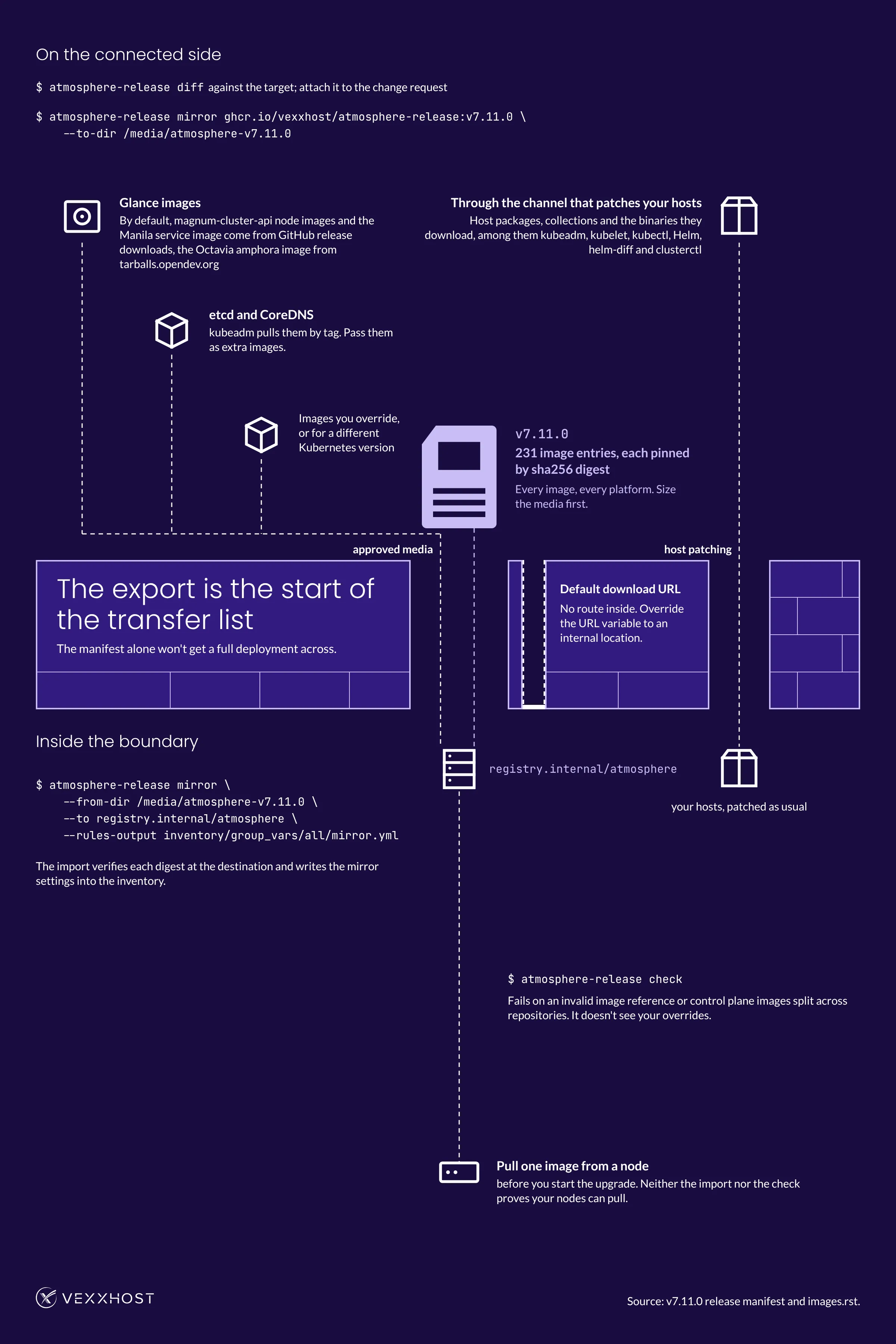
The first install proves the transfer works once. The second release proves the procedure. Pieced together from the documented commands, a crossing looks like this:
The image side is now mechanical. The OpenStack upgrade itself still needs the staging and health gates in our OpenStack upgrade playbook. The Open vSwitch restart handling we added to Atmosphere upgrades also matters more at a site where a dropped data plane can't be debugged with outside help.
With our On-Premise edition, Atmosphere runs in your own data center. Your team can run it with our support, or hand day-to-day operations to us remotely. That choice shapes who does the work on each side of the air gap.
With remote operations, our team runs the cloud from outside your facility while you keep ownership, where your site's rules allow that management access. With either model, settle who carries the media, runs the import and runs the upgrade for each site before the first crossing. Our private cloud plans include 24×7 engineers. If you're weighing the two models for a specific site, our team can walk you through both On-Premise models. The cost side of each operating model is in our OpenStack private cloud architecture and costs guide.
How often to cross is still open. Releases can come faster than a transfer window: the 2025.2 branch got three tags within a week, v7.9.0 on October 27, v7.10.0 on October 28 and v7.11.0 on November 2.
Each export holds every artifact in the target manifest, whatever you ran before. It still needs the extra images and non-container items above. The diff from your running release shows the whole image change at once. Whether your upgrade path can skip intermediate tags is a separate question. Settle it against the release notes before you plan around it.
Two things set the cadence: how long your transfer and review take end to end, and how fast a security fix has to land. Set your regular crossing by the first. Decide in advance what makes a fix urgent enough for an out-of-cycle crossing, because that one comes without warning. Write down the release you run, the media size for the next one, the non-container artifacts that travel with it, and who signs on each side. Once that's written, the next crossing is routine work for both teams.
Choose from Atmosphere Cloud, Hosted, or On-Premise.
Simplify your cloud operations with our intuitive dashboard.
Run it yourself, tap our expert support, or opt for full remote operations.
Leverage Terraform, Ansible or APIs directly powered by OpenStack & Kubernetes