
Sovereign by Architecture: Building AI Infrastructure for the EU AI Act
The EU AI Act takes effect August 2026. Compliance starts at the infrastructure layer. Learn why sovereign AI needs OpenStack, Kubernetes, and Atmosphere.

Perspectives, mises à jour et histoires de notre équipe
The EU AI Act takes effect August 2026. Compliance starts at the infrastructure layer. Learn why sovereign AI needs OpenStack, Kubernetes, and Atmosphere.
Learn how a lightweight keystoneauth1 plugin brings your existing browser-based MFA and SSO to the OpenStack CLI, with no changes to any client tools.
Hyperscaler AI looks fast but hides long-term lock-in and rising costs. See how OpenStack and Kubernetes deliver GPU infrastructure you actually control.

Done with VMware costs and lock-in? Here's a step-by-step plan that helps you move to OpenStack with Migratekit. You gain control, cut licensing costs, and move in auditable phases with near-zero downtime.
VMware environments are dependable but closed. Over time, costs, licensing restrictions, and rigid integrations start to shape how teams operate. Many organizations have reached a point where they want more control not only over expenses, but also over the way their infrastructure evolves.
That's why teams are turning to open platforms to regain autonomy and transparency.
As of 2024, OpenStack powers over 40 million cores globally, running production environments for telecom operators, research institutions, and national clouds. In the last two years, migrations from proprietary platforms to OpenStack-based clouds have accelerated by over 35%, according to the OpenInfra Foundation.
OpenStack, backed by a decade of active development and large-scale deployments, offers an open alternative. It supports the same workload types as VMware (virtual machines, storage, networking) but in a way that teams can audit, automate, and extend themselves. Migrating, however, isn’t an overnight process. It requires methodical steps that account for existing dependencies, formats, and connectivity.
At VEXXHOST, engineers generally follow a structured path that includes six major phases: discovery, export/import, image conversion, workload migration, network reattachment, and post-migration validation.
Before migration, it’s essential to know the precise state of the VMware environment. Environments that have evolved over several years often include orphaned VMs, unused volumes, and configuration drift.
Using Migratekit, VEXXHOST’s open-source CLI tool, engineers pull workload definitions directly from vCenter - CPU, memory, storage paths, VLANs, tags, and relationships between instances. The output is a machine-readable YAML inventory that becomes the baseline for planning.
This inventory also exposes dependencies, like which workloads share networks, which VMs depend on common storage volumes, and which ones can be migrated independently. While Atmosphere automates OpenStack deployment, building this dependency view typically requires support from VEXXHOST’s professional services team, who validate the migration order and highlight potential inter-service breakpoints.
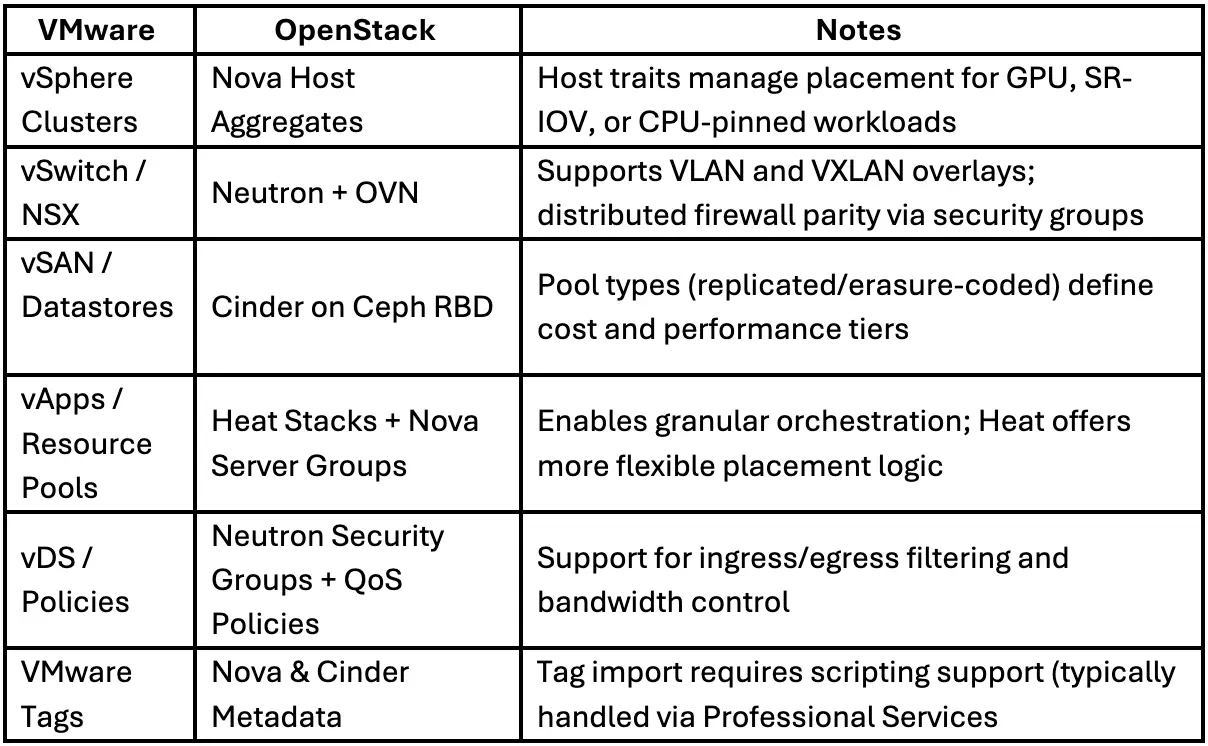
Once the inventory is complete, workloads are exported from vCenter and mapped to OpenStack’s resource model.
Each VMware construct has a direct or near-direct equivalent in OpenStack:
During this process, Octavia, OpenStack’s native load balancer, is deployed automatically as part of the standard stack. It’s not optional, but its configuration (e.g., HAProxy vs. amphora driver) depends on the deployment’s scale and traffic patterns.
Metadata from vCenter, such as tags or policies, doesn’t automatically transfer. Custom scripts or support from the professional services team handle the translation into OpenStack metadata so those attributes can continue driving automation or reporting post-migration.
VMware virtual disks use the VMDK format, which isn’t natively compatible with OpenStack’s storage backend. Each disk needs to be converted into a format that can be stored in Ceph RBD and accessed by Cinder.
Using qemu-img, engineers convert VMDK files to QCOW2 and then import them into Ceph. The process is parallelized to minimize transfer time and validated with checksum comparisons to prevent corruption. On typical NVMe storage, conversion throughput reaches 250–300 MB/s per thread, and checksum validation adds only a few minutes per terabyte.
Converted images are uploaded to Glance, the image service in OpenStack, and attached as volumes through Cinder. Ceph handles replication, so no additional redundancy layer is needed. The average p99 latency on production clusters runs below 2 ms, even during active replication, keeping performance consistent across the migration.
Once images and metadata are prepared, the actual migration begins.
Workloads are synchronized incrementally, which minimizes downtime. The process runs in two stages:
This method keeps service interruption under a minute per instance in most cases. Data integrity checks run in parallel — verifying Ceph volume mounts, validating image hashes, and ensuring Neutron ports attach to the right networks.
Throughout the process, engineers monitor Prometheus dashboards for scheduler latency, API response times, and replication health. Any anomalies (e.g., queue buildup or lag in Galera replication) trigger alerts before cutover.
Rollback is straightforward. Every migrated VM and its data are snapshotted before cutover, so reverting to the source environment takes less than half an hour if validation fails.
After workloads are live, networking becomes the focus. VMware NSX or vSwitch networks are recreated in OpenStack’s Neutron service using OVN for software-defined networking.
Maintaining functional equivalence requires careful review of VLAN mappings, MTU settings, and distributed firewall rules.
While NSX uses hypervisor-level distributed firewalls, Neutron uses security groups to achieve similar isolation. The semantics differ, but rule coverage can be matched with pre-migration audits and automated rule translation scripts.
Atmosphere’s monitoring stack, Prometheus, Grafana, and Loki, provides visibility during this phase. Engineers verify that routing tables converge properly (typically within a few seconds across thousands of ports) and that packet loss remains within baseline thresholds.
For environments that require identity federation, Keycloak integrates with Keystone in Atmosphere’s Hosted and On-Premise editions, enabling LDAP, SAML, or OpenID Connect without external proxies. The Cloud edition uses Keystone standalone, ensuring identity boundaries remain under customer control.
Once workloads stabilize, validation covers both operational and user-facing aspects. Automated checks confirm instance boot health, Ceph I/O performance, and Keystone authentication.
Logs flow into Loki, metrics into Prometheus, and dashboards into Grafana.
Usage tracking is handled by Stratometrics, which collects granular compute, storage, and GPU-hour data for cost visibility and capacity planning. This data-driven view replaces the fragmented reporting common in legacy environments, giving teams an auditable record of how their infrastructure performs.
Migration isn’t a single event; it’s a controlled sequence of reversible steps.
Each stage produces verifiable artifacts: inventories, converted images, and snapshots. Rollback points are built in, and staging environments mirror production using the same deployment templates.
After cutover, the same telemetry stack used for monitoring the migration continues to track long-term performance. All infrastructure components — compute, storage, networking — are observable through open metrics, without depending on proprietary consoles.
Staying Upstream
Atmosphere’s lifecycle management tracks the OpenStack release cadence, so environments remain compatible with new upstream features without forced re-architecture. This continuous alignment means teams can adopt newer drivers, Kubernetes integrations, or Ceph enhancements at their own pace.
A VMware-to-OpenStack migration can be broken down into measurable, auditable phases:
Each stage builds on the previous one, with clear checkpoints for verification.
By handling conversion, observability, and rollback as core parts of the process rather than afterthoughts, teams can modernize their infrastructure without losing the reliability they already depend on.
Choose from Atmosphere Cloud, Hosted, or On-Premise.
Simplify your cloud operations with our intuitive dashboard.
Run it yourself, tap our expert support, or opt for full remote operations.
Leverage Terraform, Ansible or APIs directly powered by OpenStack & Kubernetes